Stop sending the same documents
Keep your evidence in the Document Vault and reuse it across buyer relationships. Share the relevant records instead of repeatedly assembling attachments and uploading the same files.
FREE FOR VENDORS. OPEN TO OPPORTUNITY.
Free to list, claim and participate, without subscription, participation fees or award commission. Showcase your products, services, brands and coverage to buyers looking for businesses like yours. List or claim your business on Vendoreye so buyers can discover your capabilities and invite you to relevant opportunities.
One profile. Reusable evidence. Sharing you control.

PUBLIC TENDERS · UPDATED DAILY
Find opportunities, save favourites and open original notices with a free vendor account.
Claim or create your profile, maintain your information, submit documents, respond to buyers and participate in tenders and auctions without a Vendoreye subscription, participation fee or award commission.
Free access does not guarantee verification, buyer approval or contract awards. Supported checks are included in buyer subscriptions.
Understand buyer-funded access →LESS REPEATED ADMIN. MORE TIME FOR BUSINESS.
Every new buyer should not mean rebuilding the same document pack. Use one Vendoreye profile and Document Vault across buyers on the platform, with control over what you share.
Trade licence · ownership information · policies · site-review evidence · assessment responses
Manage access
Keep version history
Update evidence in one place
Keep your evidence in the Document Vault and reuse it across buyer relationships. Share the relevant records instead of repeatedly assembling attachments and uploading the same files.
Reuse applicable assessment responses and supporting evidence from earlier buyer reviews. Focus on what is new or different in the next buyer’s requirements.
Manage which buyers can access your documents. Evidence shared for a buyer review stays distinct from the information you choose to show on your public business profile.
Upload the renewed licence as the latest version in your Document Vault. Buyers with the relevant shared access can use the updated record, so you do not have to resend the file separately to every buyer.
Store the site-review evidence or information-security policies shared with one buyer. When another buyer asks for the same material, share the existing evidence and reuse the relevant assessment work.
A new buyer may need an updated review, extra questions or its own approval. Reuse saves repeated work; it does not transfer another buyer’s approval.
MAKE YOUR CAPABILITIES EASY TO FIND
Your listing is more than a company name. Keep a clear, current picture of what you offer so buyers can assess relevant opportunities.
Describe your products, services, brands, categories and catalogue. Explain your capabilities and what makes your offering useful to the buyer.
Explain your business model and role: manufacturer, distributor, reseller or service provider, as applicable. Keep contacts and business details current.
Show your operating locations, branches and service coverage. Help buyers understand whether you can fulfil their requirement where the work is needed.
A current profile helps buyers judge fit and invite suitable businesses. Listings, verification and reusable evidence do not guarantee invitations or contracts.
START WITH YOUR BUSINESS RECORD
Vendoreye has 134,254 listed vendors. Check whether your business is already listed, manage its profile and prepare the evidence buyers need.
Find your existing listing before creating a profile.
List or claim →Use the portal checklist to prepare and submit evidence.
Prepare for verification →Understand invitations, bids and what happens after an award.
Get ready for business →FIND BEFORE YOU CREATE
Try the legal name on your trade licence if you cannot find the trading name. Search results open in the existing vendor directory.
Open the matching public profile. Confirm its business details and select the claim action. Complete the existing ownership and access checks.
Compare the legal entity and location before choosing. Do not claim a similarly named company or create a duplicate to bypass an access issue.
After checking the directory, register a vendor profile and provide your business details.
Create a vendor profile →Sign in with your existing account. If another colleague manages the business, ask your administrator for access. If ownership or access is disputed, contact support rather than creating another listing.
Claiming establishes management access. It does not automatically verify the business or approve it for a buyer.
Browse public tenders on Vendoreye, then sign in with a free vendor account to view complete notices and original sources. Check eligibility, scope, amendments and deadlines before preparing a response. Follow the original notice's submission instructions; a Vendoreye account does not confer eligibility or guarantee an award.
Use the supplier prequalification guide to prepare for the buyer's evidence requirements.
VERIFY YOUR BUSINESS
The portal checklist is the authority for your submission. Requirements depend on your business and the verification workflow.
Verify your corporate email, ensure your organisation has an administrator and use an authorised account. Check that your profile matches the current trade licence and confirm extracted details when requested.
Declare the requested ownership information, including the ownership chain where another company is involved. Supply the service-specific evidence in your checklist; avoid unrelated personal information.
Correct missing or inconsistent details. Submit evidence without a vendor subscription or verification fee. Free participation does not guarantee a verified status or buyer approval.
Follow the actual status in your portal. Do not submit repeatedly. If the reviewer requests more information, correct the specified details or attach the missing evidence and follow the resubmission instructions.
If verified, keep evidence current and check validity dates. Verification validity follows the applicable workflow and licence expiry. If unsuccessful, read the reason and the available next steps.
Platform verification is different from buyer approval. A buyer may require its own assessment, security review, insurance or service-specific evidence.
GET READY FOR BUSINESS
Add specific products and services, relevant categories, brands where applicable, service locations and current contacts. Include a catalogue or brochure where supported. Keep your licence and requested evidence ready.
Check the scope, questions and due date. Complete assigned assessments and attach the requested evidence. A complete profile does not automatically give access to every buyer’s opportunities.
Address the requested scope, quantities, delivery, exclusions and commercial terms. Ask for clarification when needed and acknowledge amendments. Submit through the assigned portal workflow before the deadline.
After an award, confirm contract obligations and milestones, record delivery evidence and follow the invoice process. Tell the buyer about exceptions, respond to feedback and renew expiring documents.
CLEAR ANSWERS
Your business has a public directory record. A listing alone does not mean that the business has been verified.
An authorised person has completed the process to manage the existing business profile.
The platform has reviewed the required business evidence. Check the current status and validity; verification is not a guarantee of legal compliance.
A particular buyer has accepted your business under its own qualification requirements. Another buyer may ask for different evidence.
A buyer has asked your business to take part in a specific process. Read its instructions and deadline.
Questions and evidence used to understand whether your business meets the buyer’s requirements.
Your response to a buyer’s sourcing request, including the requested price, scope and supporting information.
An award records the sourcing outcome. The engagement tracks the agreed work, obligations and delivery.
They help establish who ultimately owns or controls the business. The evidence required depends on the review and applicable requirements; a legal name alone may not explain a complex ownership structure.
Renew it and follow the portal’s instructions to update the evidence. Check your verification status; an old badge is not a substitute for current evidence.
INSIDE THE VENDOR PORTAL
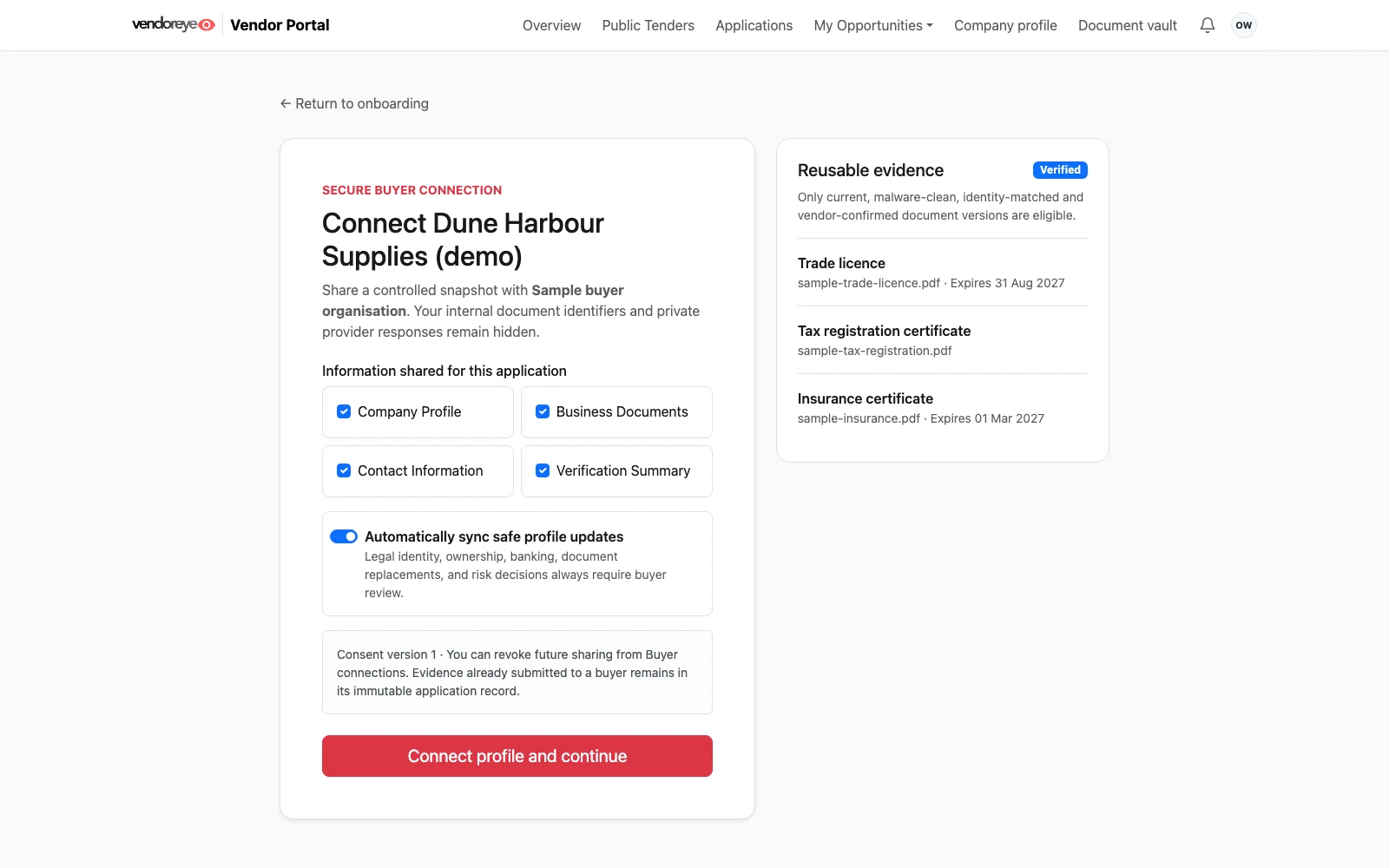
Connect your profile to a buyer application, choose the information to share and reuse eligible documents. Free for vendors.
Rendered from Vendoreye platform screens with fictional sample data, not live customer records. Available views depend on permissions and configuration.
LET’S MAKE THE NEXT STEP CLEAR
Find your profile, prepare your evidence and keep your details current.
Find my business →