How to register on ADGPG: Abu Dhabi government supplier registration
Last updated: 16 October 2026. Official sources checked: 16 October 2026.
In brief
- Abu Dhabi government entities buy through the Abu Dhabi Government Procurement Gate (ADGPG), run by the Department of Government Enablement (DGE). The portal lists 55+ government entities and 24,000+ registered suppliers.
- If your trade licence is from the Abu Dhabi Department of Economic Development (AD-DED), you can self-register. If it is not (for example an ADGM, other-emirate or foreign licence), a government entity must start the registration for you.
- You attach your licence and enter contact, VAT, bank and (for non-AD-DED suppliers) ownership details, then accept a mandatory Supplier Declaration.
- ADGPG does not publish a registration fee. Non-AD-DED requests are "typically" answered "within a few working days". No time is published for AD-DED registrations.
- After approval, public tenders are listed on ADGPG and invitations arrive by email. Logging in uses an authenticator app.
The question this guide answers
How does a company register as a supplier to the Abu Dhabi Government on ADGPG? What does it need to have ready, and what happens after it submits?
This guide uses only ADGPG's own pages and manuals, plus u.ae. Where ADGPG does not state something, we say "not published by the portal". It is general information, not legal advice.
Who should register
Register on ADGPG if you want to sell goods, services or projects to Abu Dhabi government entities that buy through the portal. According to u.ae, "registration is a one-time process for businesses registered in Abu Dhabi", and once you are registered your profile becomes visible to procurement teams in the government entities that use the portal (u.ae).
Two cases fall outside this guide:
- UAE Armed Forces and Abu Dhabi Police. u.ae says the Tawazun Council manages their procurement and contracts, including "registering suppliers and reviewing their requests".
- Federal, Dubai and northern-emirates buyers. These use other portals; see every UAE registration portal in one place.
Eligibility: AD-DED, free zone and foreign licences
ADGPG sorts suppliers by the authority that issued their trade licence (ADGPG FAQ):
| Your licence | ADGPG classification | How registration starts |
|---|---|---|
| Abu Dhabi mainland licence issued by AD-DED | AD-DED supplier | You self-register |
| Abu Dhabi free zone licence, e.g. ADGM | Non-AD-DED supplier | A government entity initiates it, then you get an email link |
| Licence from another emirate or a free zone elsewhere in the UAE | Non-AD-DED supplier | A government entity initiates it |
| Foreign company (no UAE licence) | Non-AD-DED / international supplier | A government entity initiates it |
The FAQ is explicit: "If your trade license is issued by the Abu Dhabi Department of Economic Development (AD-DED), you are an AD-DED supplier. Otherwise, you are considered a non-AD-DED supplier." It also says that "companies without a valid AD-DED license cannot complete self-registration" and should contact the government entity they intend to work with.
Two licences? If a company has an AD-DED branch and a non-DED head office, "both entities must be registered independently". ADGPG recommends using the DED licence "for broader engagement with Abu Dhabi entities".
Documents checklist
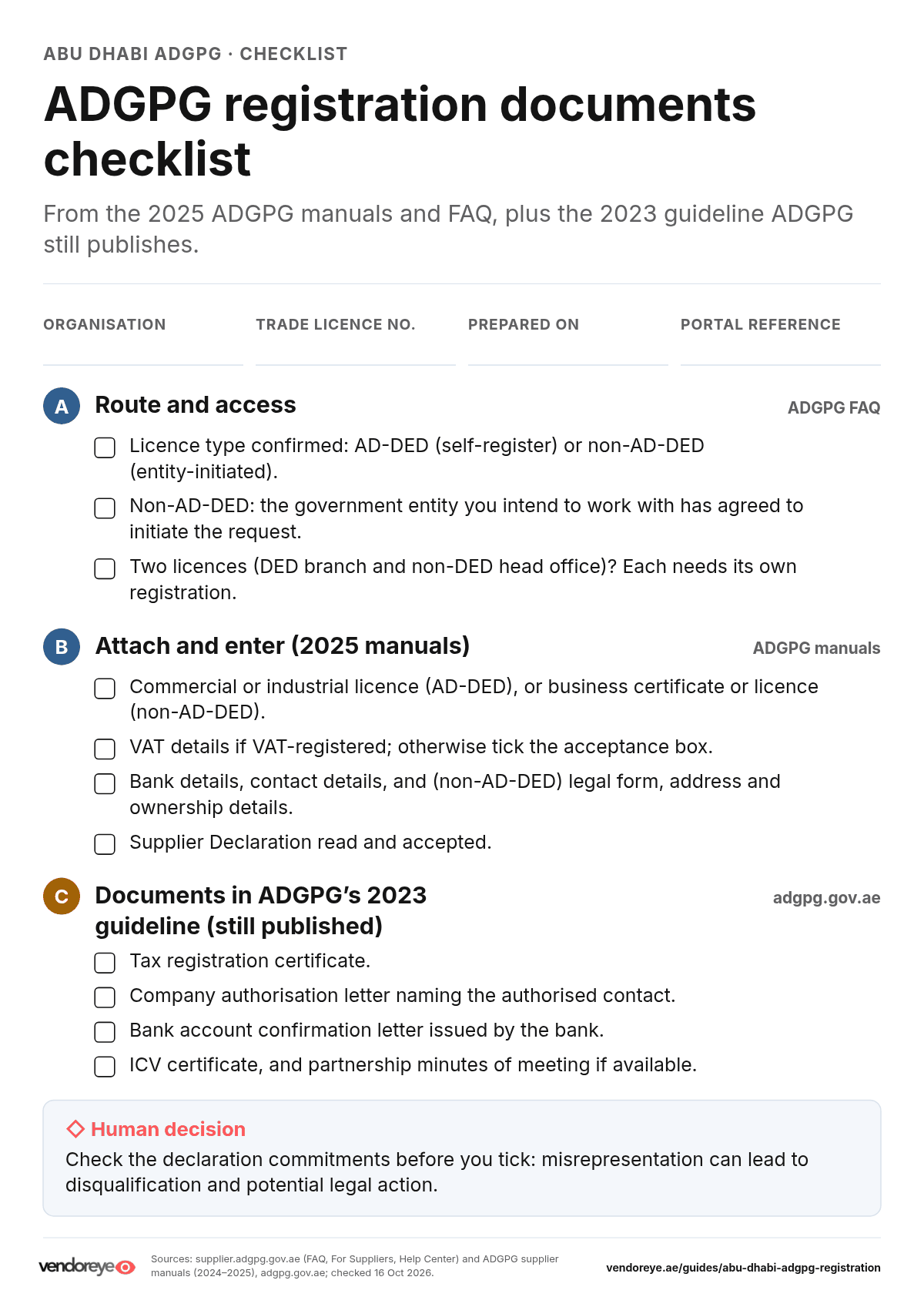
ADGPG's current manuals (2024–2025) list what you attach and enter in the form. They do not give a single consolidated documents list. ADGPG's older 2023 registration guideline, which is still published on adgpg.gov.ae, names specific documents. We show both and label where each item comes from.
From the current ADGPG manuals and FAQ
- Licence: the commercial or industrial licence (AD-DED), or the business certificate or licence (non-AD-DED), attached under Business Classification.
- Contact details for the people who will use the account.
- VAT: if VAT applies, enter the details; if not, tick the acceptance box.
- Bank details.
- Ownership details: "mandatory, especially for suppliers without an AD-DED license".
- Legal form and address (non-AD-DED form).
- Supplier Declaration: read and accept it.
- Authorisation letter: the FAQ defines it as "a formal document issued by a supplier designating a contact person authorized to act on behalf of the company in system and registration matters". It is also how you request a new username if you have no system access (full name, mobile number, job title, email address, plus a copy of the valid trade licence).
Also listed in ADGPG's 2023 guideline (Online Supplier Registration guideline, PDF)
- Commercial or industrial licence
- Tax registration certificate
- Company authorisation letter
- Bank account confirmation letter issued by the bank
- ICV certificate
- Partnership minutes of meeting (if available)
Step-by-step registration
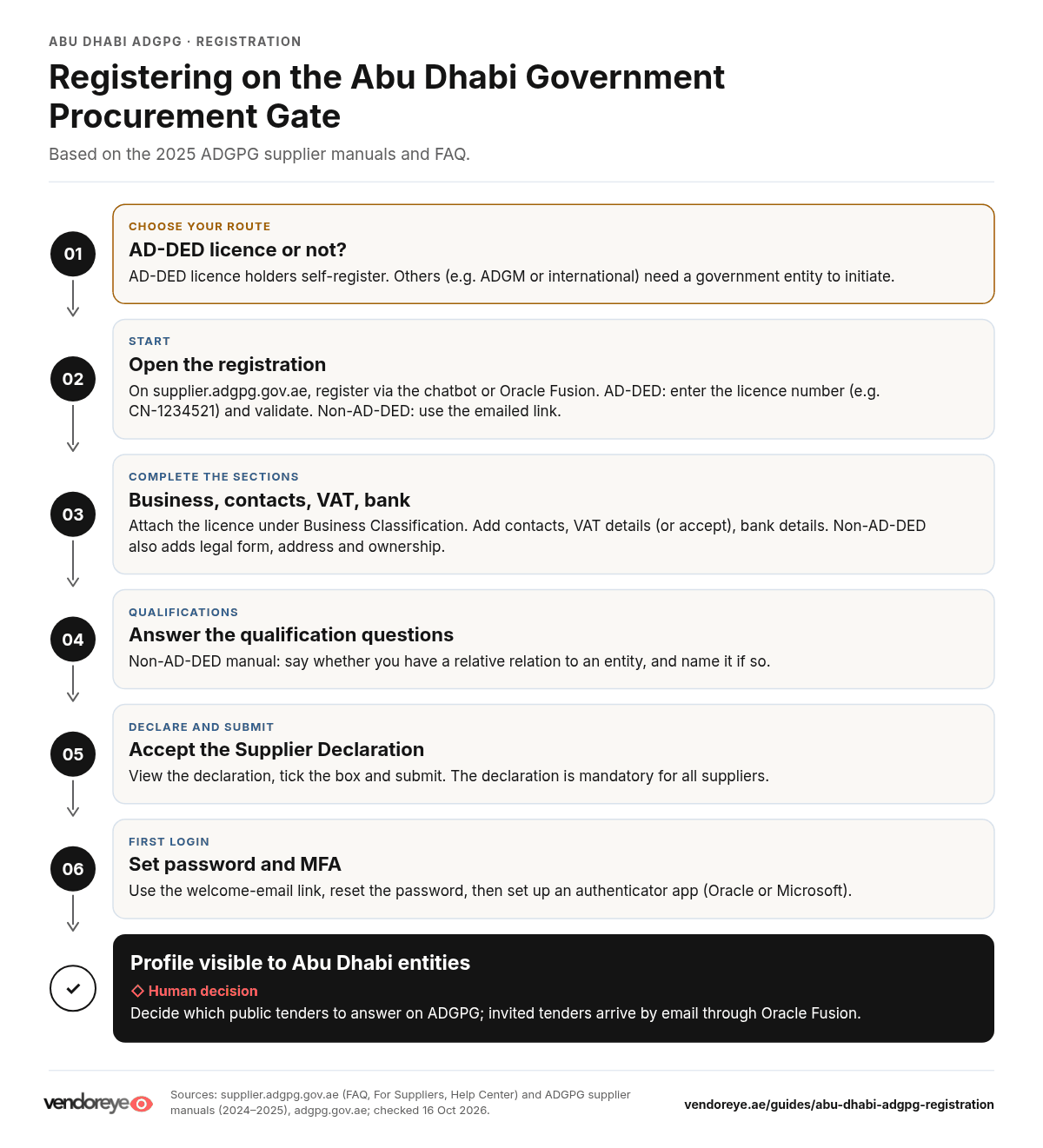
Registration starts from the supplier portal at supplier.adgpg.gov.ae. Under For Suppliers, ADGPG offers two ways to register: "Register using the chatbot or through Oracle Fusion". It adds that "registration through Oracle Fusion will soon be replaced by the AI Chatbot" (For Suppliers). The steps below follow ADGPG's 2025 manuals for the Oracle Fusion forms. The chatbot may present them differently.
Route A: AD-DED licensed suppliers
From the AD-DED supplier registration manual:
- On the supplier registration page, choose Abu Dhabi DED (AD-DED) licensed suppliers.
- Enter your DED licence number in the format XX-1234567 (the manual's example is CN-1234521) and click Validate.
- Click Start Registration. Some information is pre-populated.
- Under Business Classification, attach your commercial or industrial licence.
- Under Contact Details, add the contacts.
- Under Taxation Details, set VAT applicability. If yes, enter the details. If no, tick Accept.
- Under Bank Details, add your bank account.
- Complete the Qualifications section.
- Click View Declaration, read the Supplier Declaration and tick the checkbox.
- Click Submit.
Route B: non-AD-DED and international suppliers
From the non-DED supplier registration manual and the FAQ:
- Contact the Abu Dhabi government entity you intend to work with. The FAQ says registration "must be initiated by a requesting government entity".
- On the registration page, choose Non-Abu Dhabi DED (non AD-DED) licensed suppliers. The manual says to fill in the downloaded form and share it with the Supplier Registration Management team. Follow the instructions you receive from the entity.
- Open the email link you receive to complete registration.
- Select your Legal Form.
- Under Business Classification, add the details and attach your business certificate or licence.
- Add Address Details and Contact Details.
- Set VAT applicability (details if yes; tick Accept if no).
- Add Ownership Details and Bank Details.
- Answer the Qualification question. If you select yes, choose the relevant options from the Relative relation and Name of the Entity lists.
- Read and accept the Supplier Declaration, then click Submit.
First login: password and multi-factor authentication
ADGPG's Supplier Login Process guide (August 2025) explains the first login:
- Follow the link in your welcome email to ADERP Fusion.
- Click Forgot Password and enter the username from the email.
- Use the reset link (sent from [email protected]; check your spam folder) to set a password.
- Set up an authenticator app (Oracle Authenticator or Microsoft Authenticator). The guide says not to delete the app, because you need it every time you log in.
Fees and timelines
| Item | What ADGPG states | Source |
|---|---|---|
| Registration fee | Not published by the portal | supplier.adgpg.gov.ae (FAQ, For Suppliers, Help Center) |
| AD-DED approval time | Not published by the portal | ADGPG FAQ and AD-DED manual |
| Non-AD-DED response time | "Typically responded to within a few working days. The exact response time will be shared by the initiating entity." | ADGPG FAQ |
| How often you register | "A one-time process for businesses registered in Abu Dhabi" | u.ae |
| Re-registration after the Oracle Fusion migration | "Re-registration is not required." Existing suppliers receive a link to reset their credentials. | ADGPG FAQ |
If anyone asks you to pay a fee to register on ADGPG, confirm it with ADGPG support before paying. The contacts are under "Official links".
After approval: finding tenders
- Your profile is visible. u.ae says registered suppliers' profiles become visible to procurement teams in the government entities that use the portal.
- Public tenders are listed on the ADGPG tender list. The FAQ says you respond to public tenders "directly through the ADGPG portal".
- Invited tenders: "Suppliers will receive email notifications when invited to tenders." For private or invited tenders, follow the instructions in the Oracle Fusion notification from the sourcing specialist.
- Categories: your supplier categories in Oracle Fusion "are derived from UNSPSC codes and are mapped to the activities listed in your company's DED trade license". If your licence activities are narrow, the tenders you are matched to may be narrow too.
- One login, many entities: the FAQ says a single login works across entities "as long as the entity is operating in Oracle Fusion". Otherwise the legacy Oracle EBS system is still used.
To scan open UAE tenders in one place alongside ADGPG, see Vendoreye's UAE public tenders index. Coverage varies, so always confirm the tender on the buyer's portal.
Common rejection reasons
ADGPG does not publish a list of rejection reasons. Based on its FAQ and manuals, these are the avoidable problems to check before you submit:
- Trying to self-register without an AD-DED licence. The FAQ says this cannot be done. Ask the entity to initiate instead.
- Missing ownership details. The FAQ says these are mandatory, especially for non-AD-DED suppliers.
- Licence number in the wrong format. The AD-DED manual asks for the exact number, e.g. CN-1234521.
- Wrong or missing licence attachment under Business Classification.
- Inaccurate information. The Supplier Declaration says misrepresentation "can lead to immediate disqualification from the procurement process, potential legal action, and may affect the Supplier's standing with all government entities".
- Two licences, one registration. Each licence needs its own registration.
ICV and VAT requirements
- VAT: both registration forms ask whether VAT applies. If it does, you enter the details; if not, you tick an acceptance box. ADGPG's 2023 guideline lists a tax registration certificate among the documents to attach.
- ICV: the 2023 guideline lists an ICV certificate among the attachments. The 2025 manuals do not name it, but they include a Qualifications section. Check each tender's documents for any ICV requirement. Our ICV certificate guide explains how the certificate works.
- Declaration duties: the Supplier Declaration commits you to keep information on the portal accurate and to update it "promptly… as changes occur". It also requires compliance with UAE anti-corruption and anti-bribery laws.
FAQs
Can I register on ADGPG without an Abu Dhabi DED licence?
Not by yourself. ADGPG says companies without a valid AD-DED licence cannot complete self-registration. The government entity you intend to work with initiates the registration and you receive an email link to complete it.
Is an ADGM company an AD-DED supplier?
No. ADGPG gives ADGM licences as an example of non-DED suppliers, whose registration must be initiated by a government entity.
How long does ADGPG registration take?
ADGPG says non-AD-DED applications are typically responded to within a few working days, and the initiating entity shares the exact time. It does not publish a time for AD-DED registrations.
Is there a fee to register on ADGPG?
ADGPG does not publish a registration fee on its portal, FAQ or manuals. Confirm any charge with ADGPG support before paying.
Do I need to register again after the move to Oracle Fusion?
No. ADGPG says suppliers already registered receive a link to reset their credentials, and re-registration is not required.
My company has an AD-DED branch and a non-DED head office. Which do I register?
Both, separately. ADGPG says each trade licence must be registered independently and recommends the DED licence for broader engagement with Abu Dhabi entities.
How will I hear about tenders?
You receive email notifications when invited to tenders. Public tenders are listed on the ADGPG website, and you respond to them through the portal.
Official links
- ADGPG supplier portal: supplier.adgpg.gov.ae
- Register (chatbot or Oracle Fusion): For Suppliers
- Public tenders: ADGPG tender list
- Manuals and videos: ADGPG Help Center
- FAQs: ADGPG FAQ
- Technical and registration support: [email protected]. The login guide also gives 03-716 9999 (then press 2).
- Forgotten username or registration number: TAMM, [email protected], 800 555 (in the UAE), +971 2 666 4442 (from abroad).
References and further reading
Official sources, all checked 16 October 2026.
- ADGPG, Frequently asked questions.
- ADGPG, For Suppliers and Help Center.
- ADGPG, AD-DED Supplier Registration manual (PDF), June 2025.
- ADGPG, Non-DED Supplier Registration manual (PDF), June 2025.
- ADGPG, Supplier Declaration (PDF).
- ADGPG, Supplier Login Process (PDF), August 2025.
- ADGPG, Online Supplier Registration guideline (PDF), June 2023 (older system; used here only for its documents list).
- u.ae, Government tendering and awarding (page updated 19 May 2026).
Related resources
- UAE vendor registration: every major portal in one place
- How to register on Dubai eSupply
- UAE tender prequalification: compliance evidence
- UAE government tender readiness checklist
- ICV certificate UAE: supplier and buyer guide
- Join Vendoreye and discover active bids
Vendoreye is not affiliated with ADGPG or the Department of Government Enablement. Registering with Vendoreye does not register you on ADGPG.